One shipment. One source of truth.
Export teams spend most of their time not selling, but retyping the same details into a quote, then an order, then a document set, then a reply to the customer. AI Global Hub keeps all of it on one record. The AI fills the repetitive part, you read it and press approve.
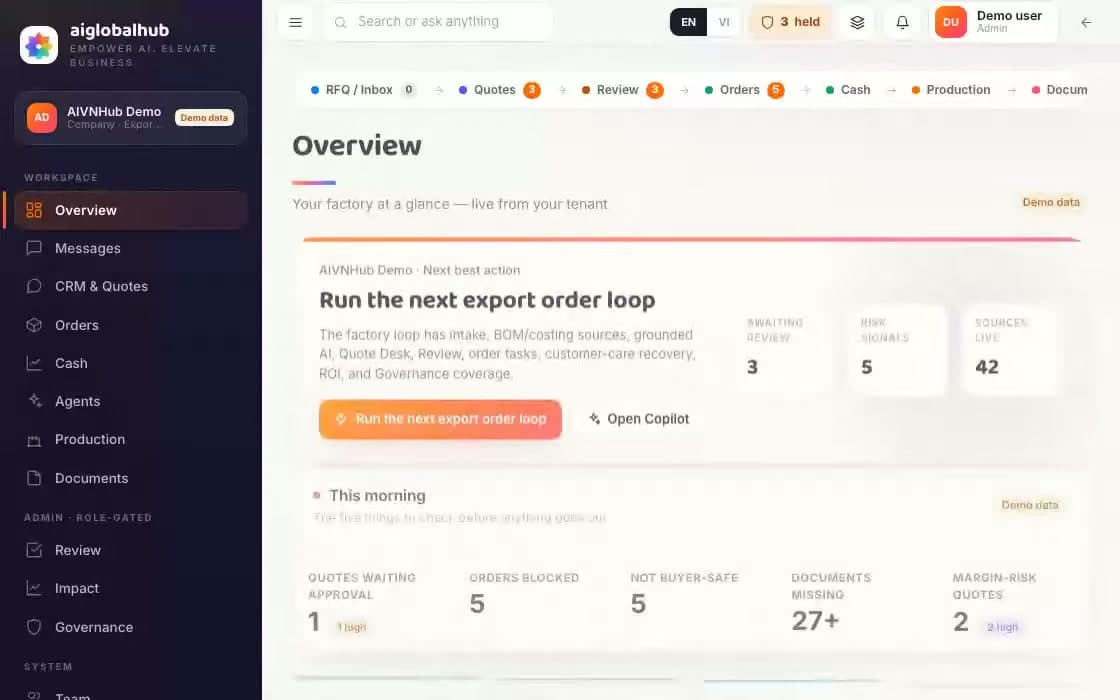
This is the product, running
Where the time goes
Not into negotiating price. It goes into the gaps between tools, the places where a person becomes the pipe that moves data.
Buyers write from everywhere
One person's email, another's Zalo, the shop's Messenger. Nobody is sure where the latest version sits.
The same details typed four times
Into the quote, the order, the invoice, the packing list. Every pass is a chance to slip.
Document gaps found late
One wrong field can hold cargo at the port. It usually surfaces around then.
“Where is my order?”
Answerable, after checking three separate places first.
Six steps a request moves through
Pick a step to see what the software does there, where the data comes from, and what has to be true before it moves on.
0106Stage 1 of 6
Buyer inbox
- What it does
- Pulls mail from email, Zalo and Messenger into one place, ties each thread to the right customer, and keeps notes and read state visible to the whole team.
- What stops it
- With no channel connected the inbox says plainly that it is empty rather than showing sample data.
- What it leaves behind
- The original message is kept, with the channel it arrived on and when.
Where data comes from
- Sender The originating channel and customer record
- Which customer Channel identity matching
- Internal notes Written by someone on the team
- Read state Shared across the workspace
A reference table, not buttons.
Start a pilot at this stageQuote
- What it does
- Builds the quote from your product catalogue, applies the pricing policy you configured, then puts the whole draft in the approval queue.
- What stops it
- A quote that drifts off your pricing policy is flagged right here, not at send time.
- What it leaves behind
- Each price line keeps its reasoning and the policy version applied.
Where data comes from
- Items and cost Your workspace catalogue
- Margin The pricing policy you configured
- Customer Customer record
- Terms Customer defaults, editable
A reference table, not buttons.
Start a pilot at this stageApproval Needs approval
- What it does
- Puts the outgoing draft in a queue with everything the agent relied on. The approver opens it, reads it, then approves or sends it back with a reason.
- What stops it
- This is a hard stop. Without an approver there is no next step.
- What it leaves behind
- Who approved, when, against which version, and the reason if returned.
Where data comes from
- Who approves Routed by role and order value
- Warnings Results of the pricing policy check
- State Waiting, approved, or returned
A reference table, not buttons.
Start a pilot at this stageOrder
- What it does
- Turns the approved quote into an order, opens the line that tracks money coming in, and records every action taken on it afterwards.
- What stops it
- Only an approved quote becomes an order. A draft has no onward path.
- What it leaves behind
- The order keeps a link back to its quote and the approval that released it.
Where data comes from
- Order contents The approved quote
- Payment terms Customer record
- Action history Written as each action happens
A reference table, not buttons.
Start a pilot at this stageDocuments
- What it does
- Assembles the document set for the order, generates the proforma, and handles upload and download with access checks.
- What stops it
- A missing required field stops the set there and names the field.
- What it leaves behind
- Each document records which version of the data it was built from.
Where data comes from
- Document contents Approved order data
- Proforma Generated from that order
- Attachments Uploaded by the team
A reference table, not buttons.
Start a pilot at this stageMessage to the buyer Needs approval
- What it does
- Drafts the reply or the progress note for the buyer, then holds it for approval.
- What stops it
- The second hard stop. It only sends when the matching approval is in an approved state, and it checks that twice: once when the API is called and again inside the database as the row is written.
- What it leaves behind
- The sent version is stored with its approver and the exact content at send time.
Where data comes from
- Message body Data confirmed at the earlier steps
- Recipient The buyer's channel and identity
- Edited version Changes the approver made before sending
A reference table, not buttons.
Start a pilot at this stageA line per channel, one engine underneath
B2B, retail, marketplace and agent orders do not travel the same road. Pick a channel to open its own line, drag the steps into the shape you actually work in, and orders follow the wires you drew. Each channel remembers its own edits.
Click a line, see where it came from
This is the difference between a quote an AI wrote and a quote you will put your name on. Every line keeps the path back to its source, and a line without a source stays blank.
Select a line to open its source
RFQ-2026-0418 · đoạn 2
…we need a quotation for the first order, delivery in July, on FOB terms. 1,000 oak chairs
Illustration, sample data
What we guarantee
Not approved, not sent
Checked twice: when the API is called, and again in the database as the row is written.
No orphan numbers
Without a source it stays blank and flagged, rather than filled with something that sounds right.
Data stays in its own workspace
Catalogues, customers and documents do not leave the workspace they belong to.
Every run can be replayed
From the buyer's message to the one you send back, with timestamps and the accountable person.
Four things export teams ask
We already run management software. Do we drop it?+
No. What you have keeps the books and the stock. AI Global Hub does the layer above it that usually sits empty: reading the request, drafting the quote, running approvals, assembling documents, writing the reply. Settled figures still flow into your system.
Will the AI email our customers on its own?+
No, and no setting turns that on. Everything headed for a buyer waits for approval. We check the approval in two places, once when the API is called and again inside the database as the row is written, so there is no way around it.
Is our pricing and customer data used for training?+
No. It stays inside your workspace and is not used to train models. Model spend is also capped per workspace, and at the cap the interface says which mode it is in rather than going quiet.
How long before we see something?+
We suggest picking one stretch, usually the buyer's message through to the quote. Build that, run it alongside your current process. After a month you have real numbers to compare instead of a demo.
Another industry, same way of working
All three share the same principles: data knows its source, anything going out needs a person to approve it, and every run can be replayed. If your team works across more than one, it all lives in one place.
Start with enquiry-to-quote
It costs the most time and it is the easiest to measure. Build that first, measure it for a month, then look at documents.